

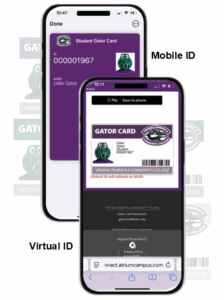
COMING SOON – CHECK BACK REGULARLY FOR UPDATED INFORMATION
Page and Information Under Contruction: Virginia Peninsula Community College is currently upgrading College Photo ID (Gator Card) infrastructure and processes, as well as vehicle registration procedures. This page will continue to be updated as we approach the release of these exciting new processes. Thank you for your patience and understanding.
VPCC is preparing to launch Gator Cards: Virtual and Mobile Photo Identification (ID) for all VPCC students and employees. Your VPCC Gator Card will serve as your official College ID, and will support safety, security, and convenience improvements.
VPCC requires all students and employees (faculty and staff) to obtain an official VPCC ID (Gator Card), and to have their Gator Card ID available when on campus/educational sites, college events, and/or when conducting college business.
You are required to present your Gator Card ID to faculty, staff, and/or public safety officials upon request.
Gator Card Mobile ID & Vehicle Registration
Gator Card Mobile ID
- Your Gator Card Mobile ID can be used everywhere a physical ID was/is accepted. With the Gator Card Mobile ID, students, faculty and staff can use their Apple or Android devices to maintain their photo ID, attend campus events and utilize select campus services.
- Students must be registered for the current semester, term, or other approved college program/course(s).
- College employees must complete the human resources onboarding process.
- Contract employees must be approved by human resources.
Vehicle Registration
- As part of the process of obtaining your Gator Card, you will be asked to provide information about the vehicle(s) that you plan to operate and/or park on campus.
- You will have the opportunity to register up to two (2) vehicles.
- If you need to remove or change a vehicle(s) from the registry, please submit an email to police-safety-security@vpcc.edu and include your student or employee identification number, your first and last name, the vehicles year, make, make, model, and color, and license plate number of the vehicle to be removed/changed in the vehicle registration system.
Gator Card Phone Requirements
Phone Requirements
- Apple:
- An Apple ID and signed into iCloud.
- iPhone SE, iPhone 6s, iPhone 6s Plus or later, running iOS 13 or later.
- Apple Watch Series 1 or later, running the latest version of watchOS.
- Android: Android version running 6.0 or later.
Proof of Identity Requirements
- Students and staff must upload a valid, government-issued photo ID in order to obtain a Gator Card ID. Your ID will be encrypted and stored on a secure server. Once your photo is reviewed, your ID will be deleted from storage.
- NOTE: Please make sure your image file is 5 MB (5000 KB) or less.
- Examples of acceptable government photo IDs include:
- A valid passport;
- Driver’s license, state-issued photo ID card, U.S. military ID, or permanent resident card;
- Other valid photo ID issued by a U.S. state, territory, U.S. Federal Government, or your current high school issued photo ID.
Gator Card Photo Requirements
All photos must be uploaded and submitted online.
- Use the photo and graphic guidelines below to help prepare and frame your photo appropriately.
- If your photo does not accurately represent you, you will be asked to retake your picture before we issue your card to you.
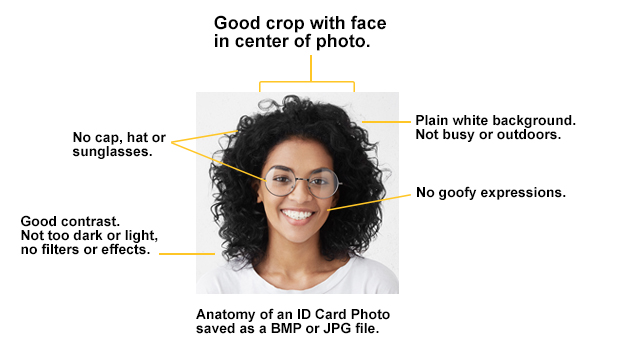
General Guidelines
- Submit a passport style photo.
- Photo Specifications
- JPEG format, color photo
- No larger than 1500 x 2000 pixels
- At least 300 x 400 pixels
- File size can be no larger than 5000 KB
- Resolution must be at least 72 dpi
- A white background with proper lighting without shadows (no photos taken in cars).
- The subject’s expression should be natural (straight face or smile).
- No phone filters.
- Eyes should be open and visible – prescription glasses are allowed.
- No hand gestures may be present in the photo.
- Applicants must face forward (side, profile, or angled views are NOT acceptable).
- No distracting articles and objects are allowed in the photo (no animals or props).
Face Cover Guidelines
- Sunglasses or other articles which obscure the face are not acceptable unless required for medical reasons (an eye patch, for example).
- In cases of medical necessity, a note from a healthcare provider must be presented before the picture can be accepted/approved.
- A replacement ID should be created as soon as the item is no longer required.
Headgear Guidelines
- Hats or other head coverings are acceptable only when required by religious beliefs, tenets, traditions or customs, and may not cover any portion of the applicant’s face.
- Another form of ID issued by a government or civil agency should be provided in support of the request. (Photographs of applicants wearing tribal, national costume, or other headgear not specifically religious in nature are not acceptable).
Gator Card Display Name
The Gator Card will display your full legal name that matches that of your submitted government issued Photo ID. The Gator Card is for campus/college event use and is intended to be used by the individual whose name and photo appear on the front of the card. Misuse is subject to judicial proceedings.
General Guidelines
- Submit a passport style photo.
- Photo Specifications
- JPEG format, color photo
- No larger than 1500 x 2000 pixels
- At least 300 x 400 pixels
- File size can be no larger than 5000 KB
- Resolution must be at least 72 dpi
- A white background with proper lighting without shadows (no photos taken in cars).
- The subject’s expression should be natural (straight face or smile).
- No phone filters.
- Eyes should be open and visible – prescription glasses are allowed.
- No hand gestures may be present in the photo.
- Applicants must face forward (side, profile, or angled views are NOT acceptable).
- No distracting articles and objects are allowed in the photo (no animals or props).
Face Cover Guidelines
- Sunglasses or other articles which obscure the face are not acceptable unless required for medical reasons (an eye patch, for example).
- In cases of medical necessity, a note from a healthcare provider must be presented before the picture can be accepted/approved.
- A replacement ID should be created as soon as the item is no longer required.
Headgear Guidelines
- Hats or other head coverings are acceptable only when required by religious beliefs, tenets, traditions or customs, and may not cover any portion of the applicant’s face.
- Another form of ID issued by a government or civil agency should be provided in support of the request. (Photographs of applicants wearing tribal, national costume, or other headgear not specifically religious in nature are not acceptable).
Gator Card Return, Surrender, Revocation, Deactivation Requirements
Your issued Gator Card (virtual or physical) is property of the Commonwealth of Virginia – Virginia Peninsula Community College (College), is non-transferable, and may be deactivated and/or revoked by the College without notice, as determined necessary and/or appropriate.
The Gator Card ID is for campus/college event use and is intended to be used by the individual whose name and photo appear on the front of the card.
Any misuse, alteration, or fabrication of the Gator Card will subject the holder to disciplinary action by the College.
Identity theft/fraud is unlawful and violators will be prosecuted.
You are required to immediately surrender Gator Cards upon separation of employment/student status from the College.
Report lost, damaged, inoperable, and/or found Gator Cards to gatorcard@vpcc.edu.
Report Stolen Gator Cards to police-safety-security@vpcc.edu.
General Guidelines
- Submit a passport style photo.
- Photo Specifications
- JPEG format, color photo
- No larger than 1500 x 2000 pixels
- At least 300 x 400 pixels
- File size can be no larger than 5000 KB
- Resolution must be at least 72 dpi
- A white background with proper lighting without shadows (no photos taken in cars).
- The subject’s expression should be natural (straight face or smile).
- No phone filters.
- Eyes should be open and visible – prescription glasses are allowed.
- No hand gestures may be present in the photo.
- Applicants must face forward (side, profile, or angled views are NOT acceptable).
- No distracting articles and objects are allowed in the photo (no animals or props).
Face Cover Guidelines
- Sunglasses or other articles which obscure the face are not acceptable unless required for medical reasons (an eye patch, for example).
- In cases of medical necessity, a note from a healthcare provider must be presented before the picture can be accepted/approved.
- A replacement ID should be created as soon as the item is no longer required.
Headgear Guidelines
- Hats or other head coverings are acceptable only when required by religious beliefs, tenets, traditions or customs, and may not cover any portion of the applicant’s face.
- Another form of ID issued by a government or civil agency should be provided in support of the request. (Photographs of applicants wearing tribal, national costume, or other headgear not specifically religious in nature are not acceptable).
Damaged, Inoperable, Lost or Stolen Gator Card
Gator Card – Damaged or Inoperable
- Immediately report your damaged or inoperable Gator Card to gatorcard@vpcc.edu and include your name and student or employee number, the date of damage or inoperability. If your Gator Card is inoperable, please provide the following in your email:
- A brief description of the problem(s) experienced.
- The location where the problem(s) was experienced.
- You will be provided information about what to do with your card.
- If a replacement is required, you will not be charged for non-damaged inoperable cards.
- You may be charged a replacement fee if your card is damaged due to misuse or negligence.
Gator Card – Lost
- Immediately report your lost Gator Card to gatorcard@vpcc.edu and include your name and student or employee number, the date of loss, and last known location.
- Your card will be deactivated and you will be required to obtain a replacement.
- You may be charged a replacement fee if you lose your Gator Card.
Gator Card – Stolen
- Immediately report your stolen Gator Card to police-safety-security@vpcc.edu and include your name and student or employee number, the date and location of theft.
- The Department of Police, Safety, and Security will completed a police report.
- Your card will be deactivated and you will be required to obtain a replacement.
- There is no charge for the replacement of a stolen Gator Card, as long as a police report is completed.
- If you do not report the card stolen or refuse a police report, the card will be considered lost, and you may be charged a replacement fee.
Privacy Policy
Your account and personal information will be kept strictly confidential as per the Family Educational Rights and Privacy Act. Non-VPCC staff will not be privileged to information about you or your account without your express consent unless such disclosure is in compliance with a court order or government legislation.
Gator Card Help and Frequently Asked Questions
Gator Card Frequently Asked Questions, if you do not find the answer to your question(s) below, email us.
- What if I do not have a mobile device that supports a mobile (virtual) Gator Card?
- Additional information may be requested by emailing gatorcard@vpcc.edu.
- How long does it take for my Gator Card request to be processed?
- Please allow 1-3 college business days for your request to be reviewed and processed.
- Is there a charge for my Gator Card?
- There is no charge for the initial issuance of your Gator Card. You may be charged a replacement fee for lost or damaged Gator Cards due to issuer negligence.
- If you are charged a replacement fee, you will be required to remit payment and submit a copy of your receipt of payment to gatorcard@vpcc.edu prior to replacement Gator Card issuance.
Upload Your Photo, Register Your Vehicle(s), and Request Your Gator Card (VPCC ID)